Skip to content
All modules Academics

Timetable Management software for Indian schools

Auto-scheduling with clash detection

Feature identity

Timetable Management

An illustration, not a screenshot. The interactive example below shows what this capability actually does.

Example view

Timetable Management in a school workflow

Auto-scheduling with clash detection

Academics
First-party product evidenceSynthetic demo fixture · no customer data

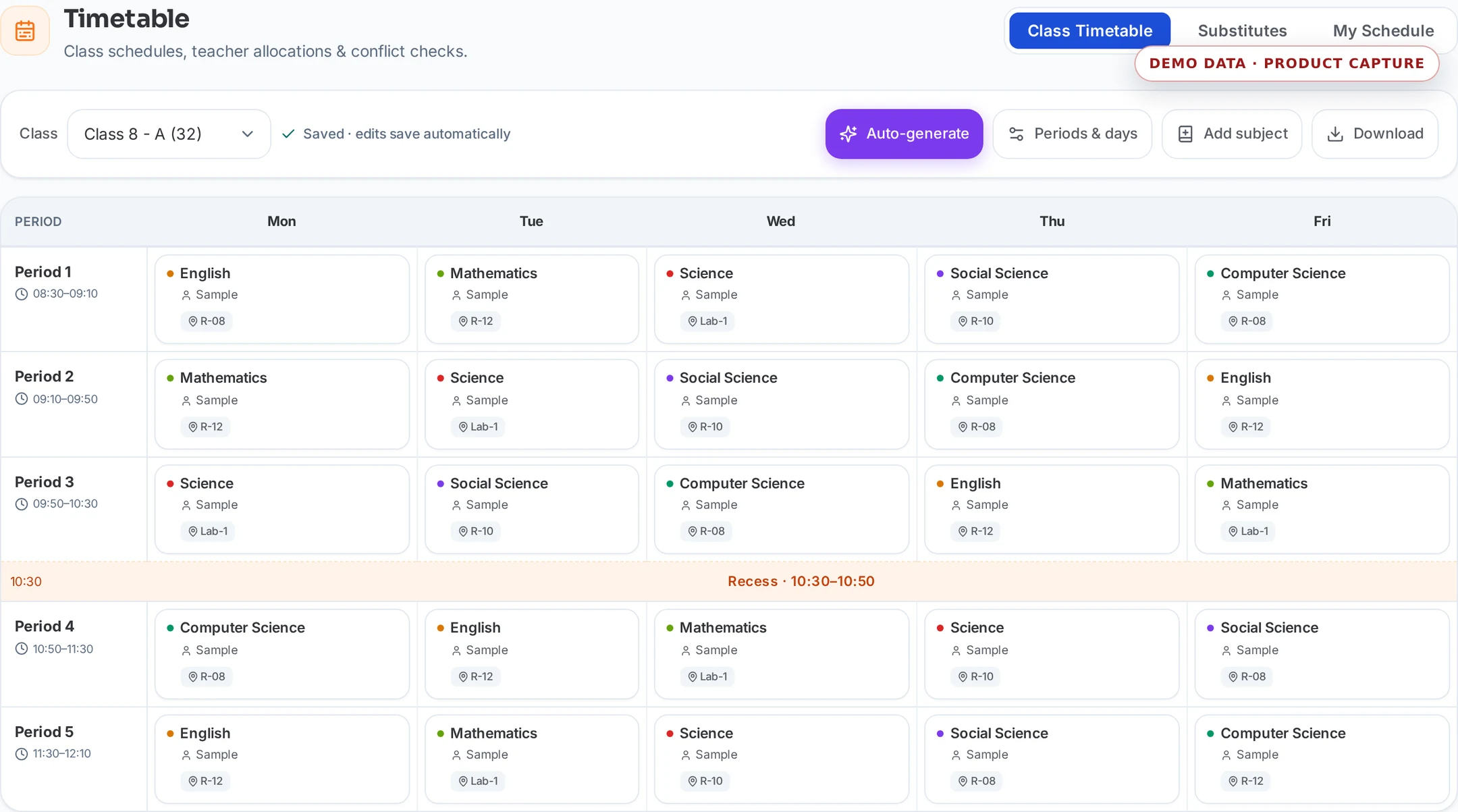
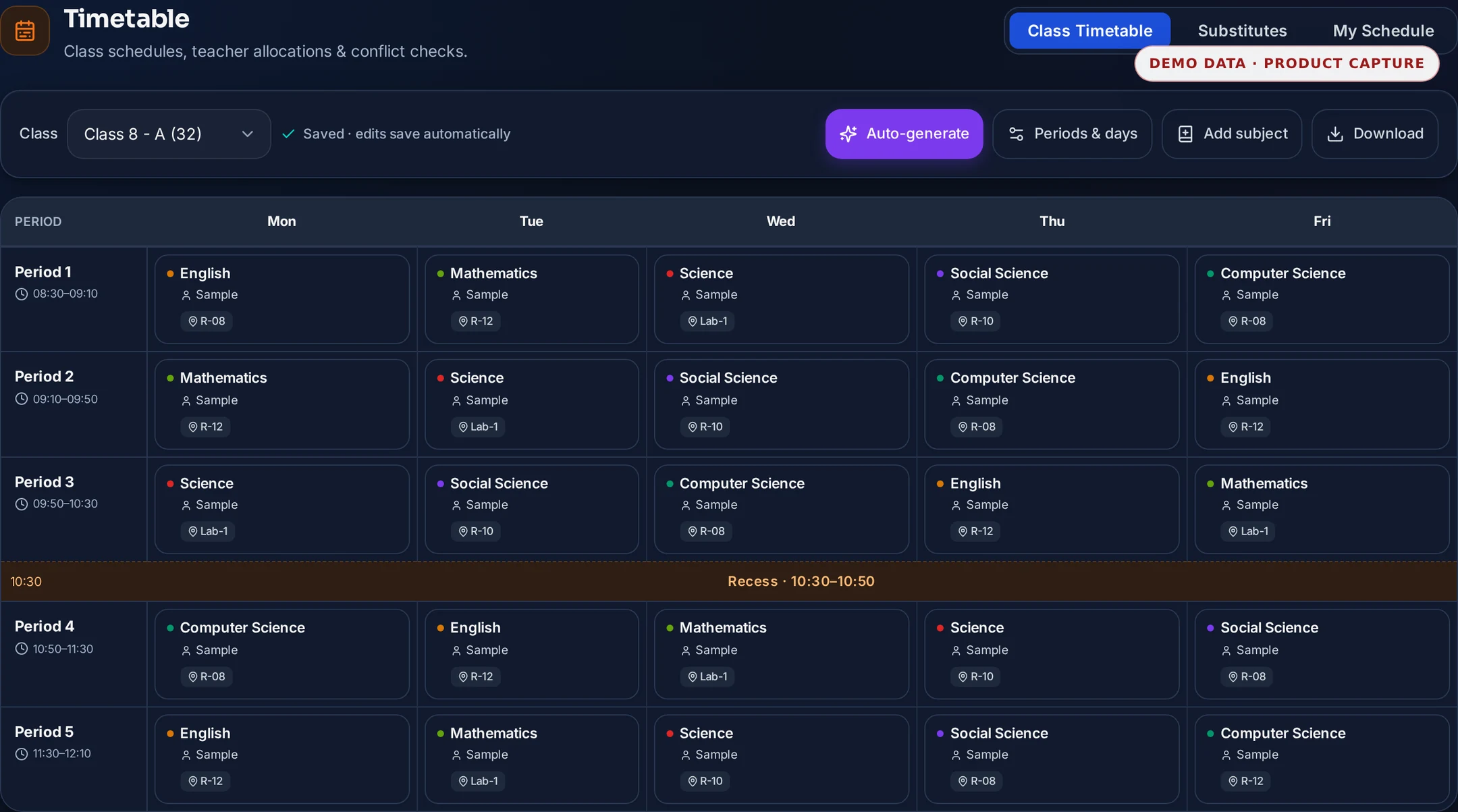
Timetable workspace. Captured from the shipped Timetable route with a deterministic Class 8A fixture. The capture follows the selected light or dark theme.

Read the accessible sample fields
Weekly timetable proof
Illustrative weekly grid
Selected class and sectionAcademic weekConflict review
PeriodMondayTuesdayWednesdayThursdayFriday
Period 1Scheduled fieldMathematicsScheduled fieldScienceScheduled fieldEnglishScheduled fieldLibraryScheduled fieldPhysical education
Period 2Scheduled fieldScienceScheduled fieldEnglishReviewLibraryScheduled fieldPhysical educationScheduled fieldMathematics
Period 3Scheduled fieldEnglishScheduled fieldLibraryScheduled fieldPhysical educationScheduled fieldMathematicsScheduled fieldScience
A publish-ready weekly timetable with clashes, workload caps and unresolved placements visible before save.
First-party product evidence · deterministic synthetic fixture · no customer data · visibly marked SAMPLE or DEMOExample labels and outcomes come from this capability's reviewed catalogue record.

Product scope

What it does

Build each class-section's weekly grid with teacher double-booking detection, workload caps and a dry-run preview before anything saves — or auto-generate a conflict-free draft from subject demands. A substitute board fills periods left open by approved leave, and every teacher gets an iCal feed of their schedule.

The school problem

School teams need a dependable way to handle Timetable Management: Auto-scheduling with clash detection. The required records, assigned roles and review boundary must remain explicit.

Day-to-day work

How your school uses it day to day

Auto-scheduling with clash detection.

  1. Catch teacher double-bookings and weekly over-cap warnings BEFORE the grid saves, with a dry-run preview
  2. Auto-generate a conflict-free draft from subject demands, honouring per-teacher and per-room caps
  3. Fill periods left open by approved leave from a ranked substitute board — same-subject teachers first
  4. Give every teacher an iCal feed of their weekly schedule for Google, Apple or Outlook calendars

Operational result

What your school gets

A publish-ready weekly timetable with clashes, workload caps and unresolved placements visible before save.

Access and ownership

Who typically uses it

  • Timetable administrator
  • Academic coordinator
  • Principal
  • Teacher

What each person can actually see depends on the role you give them and which classes or records you assign.

Availability and setup

What to confirm before rollout

Academics catalogue capability

  • Classes, sections, subjects, teachers, working days and period configuration
  • Confirm plan scope, role permissions, data dependencies and any provider or migration prerequisites during the demo and proposal.

Flagship workflow deep dive

Timetable, Workload & Substitute Coverage

One grid the whole school can trust.

Build each class-section's weekly grid with teacher double-booking detection, workload caps and a dry-run preview before anything saves, or auto-generate a draft with no clashes in what it places, listing any subject demand it could not fit. A substitute board fills the periods that approved leave leaves open, and every teacher can subscribe to their own schedule feed.

Interactive operating model

From constraints to a published week

Follow one period from the configuration that bounds it to the cover that keeps it taught.

Illustrative workflow · no customer data

Stage 1 of 5

Framework configured

Working days, period slots, subjects, teachers and caps establish the academic week.

Control point

Every later check reads this one configuration, so the rules cannot fork per coordinator.

Evidence retained

Period framework, subject list and per-teacher caps.

Core workflows and features

The operational work behind the promise

  1. Period framework firstConfigure working days, daily period slots and break placement once, so every class-section grid is built on the same academic week.
  2. Class-section gridsPlace a subject and a teacher in each period of a class-section's week, and keep the whole grid reviewable in one screen instead of a printed sheet.
  3. Double-booking detectionCatch a teacher placed in two class-sections in the same period before the grid saves, rather than discovering the clash on the first day of the term.
  4. Weekly workload capsWarn when a teacher's placed periods cross the weekly cap the school configured, so load is balanced by evidence and not by memory.
  5. Dry-run previewReview the conflicts, cap warnings and unresolved placements a proposed change would produce, and decide before anything is committed to the live grid.
  6. Constraint-based draft generationGenerate a draft with no clashes in what it places, and see exactly which subject demands it could not fit, so a coordinator resolves the gaps before publishing.
  7. Room and resource limitsKeep a room from being scheduled twice in the same period, so a lab or hall constraint is enforced by the grid rather than by a coordinator's notes.
  8. Substitute board for approved leaveSee exactly which periods an approved leave leaves uncovered, on the day it matters, instead of reconstructing the gap from a leave register.
  9. Ranked cover suggestionsRank available teachers for an open period with same-subject teachers first, so a coordinator chooses from a shortlist and records who actually covered.
  10. Personal schedule feedGive each teacher a calendar feed of their own weekly schedule that they can subscribe to from Google, Apple or Outlook calendars.
  11. Timetable as teaching scopeUse the same placements to establish which class-sections a teacher may reach in attendance and marks, so scheduling and record-level access never disagree.

Deterministic scheduling controls

Constraints produce the draft; a person publishes the timetable.

Generation and clash detection are rule-based calculations over the school's own configuration. They surface conflicts, caps and gaps for review; they never decide the academic week on their own.

  • Detect teacher double-bookings and room collisions from the configured grid before a save is accepted.
  • Warn on weekly workload caps using the school's own per-teacher configuration.
  • Generate a draft with no clashes in what it places, and list the subject demands it could not fit, for a coordinator to resolve.
  • List periods left open by approved leave and rank eligible cover teachers, same subject first.

Human boundary

No model writes your timetable. The generator proposes a draft from the constraints you configure, and a timetable administrator reviews and publishes it. Substitute cover is assigned by a person, from ranked suggestions, and the assignment is recorded.

Key daily uses

What the school team does here

  1. Build or amend a class-section's weekly grid and review the dry-run before saving.
  2. Check a teacher's weekly load against the configured cap before adding a period.
  3. Generate a starting draft for a new term from the subject demands.
  4. Fill the periods an approved leave left open and record who covered them.
  5. Share each teacher's schedule as a calendar feed instead of a printed slip.

Used by

  • Timetable administrator
  • Academic coordinator
  • Vice principal
  • Principal
  • Class teacher
  • Subject teacher
  • Substitute coordinator

Actual access follows the school's plan, role permissions and record scope.

Measurable operating indicators

Metrics to track — not guaranteed ROI

Establish a baseline before rollout, agree the reporting period, then compare the school's own source evidence.

Conflict clearance

Detected double-bookings and room collisions resolved before publish

Shows whether the grid is being corrected at design time instead of during the teaching week.

Teaching-load balance

Weekly placed periods per teacher against the configured cap

Makes an over-loaded or under-used teaching allocation visible while it can still be changed.

Cover completeness

Periods opened by approved leave against periods filled from the substitute board

Separates a genuine staffing gap from an administrative one that was simply never assigned.

Prerequisites and availability

Confirm the operating context before rollout.

Academic catalogue capability · class, subject and teacher configuration required

  • Classes, sections, subjects, teachers, working days and period slots configured for the academic year.
  • Per-teacher weekly caps and any room constraints entered, or generation has nothing to honour.
  • Leave requests routed through the leave workflow, since the substitute board reads approved leave.
  • Calendar feeds are a subscription for each teacher's own schedule, not a two-way calendar sync.
  • Auto-generation produces a reviewable draft for a coordinator; it is not an unattended publisher.

Connected operating context

Available workflows

These are the documented neighbouring capabilities that school teams may review with this module. A related page does not imply that every hand-off is automatic or enabled in every plan.

Explore all modules

Buyer questions

Frequently asked questions

The questions school owners ask before they subscribe: what it does, who can see it, and what to set up first.

Will the generator publish a timetable by itself?

No. Generation produces a draft from the constraints you configured — subject demands, per-teacher caps, room limits. A timetable administrator reviews the conflicts and cap warnings in a dry run and decides what gets published.

How are periods covered when a teacher is on leave?

Approved leave surfaces the exact periods it leaves open on a substitute board, which ranks available teachers with the same subject first. A coordinator assigns the cover and the assignment is recorded — nothing is swapped automatically.

Does Timetable Management work on its own?

Subject Management, Teacher Mapping, Class Management, Academic Calendar are the documented neighbouring capabilities. They help a school evaluate the surrounding hand-offs, but a related page does not mean every integration is automatic or included in every plan.

What should our school prepare before enabling Timetable Management?

Classes, sections, subjects, teachers, working days and period configuration. Confirm plan scope, role permissions, data dependencies and any provider or migration prerequisites during the demo and proposal.

Is AI used in Timetable Management?

No AI capability is asserted for Timetable Management. Its documented work remains controlled by school records, roles and permissions.

How do we confirm the plan and implementation scope?

Plan inclusion and rollout scope depend on the live plan matrix, readiness state and your school's written proposal. The demo team will confirm the applicable boundary before rollout.

Related evaluation guides

See it in your school context

Run timetable management the connected way.

See how this workflow fits your school's current records, roles, plan and rollout requirements.