Skip to content
All modules HR & Payroll

Payroll software for Indian schools

Salaries and payslips

Feature identity

Payroll

An illustration, not a screenshot. The interactive example below shows what this capability actually does.

Example view

Payroll in a school workflow

Salaries and payslips

HR & Payroll
First-party product evidenceSynthetic demo fixture · no customer data

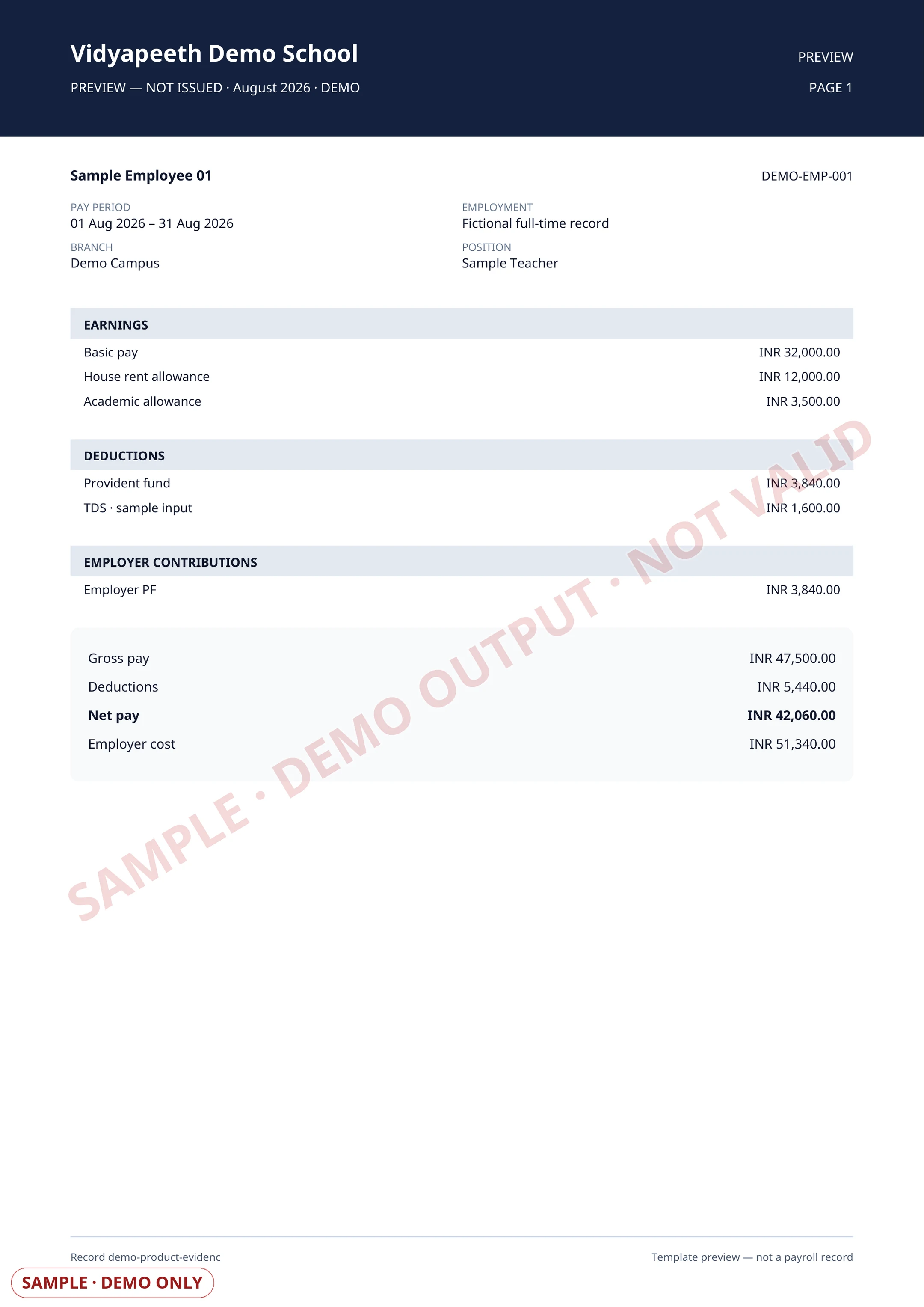
Payslip output. Rendered by the shipped payroll delivery renderer from a fictional employee and exact paise-based sample components.

Read the accessible sample fields
Payroll run and payslip proof
Illustrative payroll proof
Payroll runSelected pay period
01§192 TDS with a true-up over the remaining FY months; EPF/ESI with a per-school opt-outSchool record
02EPFO ECR v2 and ESIC challan exports that tie to the salary registerSchool record
03Bank disbursal through payout batches a second person approves, with per-employee UTRs capturedSchool record
Authorised payroll review
Vidyapeeth Demo SchoolPayslip · Sample employee
Employee record
Value not shown
Earnings
Value not shown
Deductions
Value not shown
Net payValue not shown

Illustrative payslip · no employee or payroll values
First-party product evidence · deterministic synthetic fixture · no customer data · visibly marked SAMPLE or DEMOExample labels and outcomes come from this capability's reviewed catalogue record.

Product scope

What it does

When the HR & Payroll workspace is enabled for your school (it's still rolling out school by school), run monthly payroll with configured §192 TDS calculations, EPF and ESI handling, ECR/ESIC exports, Form-16 worksheets and payslip PDFs. Bank-disbursal batches need a second approver, capture payment evidence and can post paid salary results into the school's ledger.

The school problem

School teams need a dependable way to handle Payroll: Salaries and payslips. The required records, assigned roles and review boundary must remain explicit.

Day-to-day work

How your school uses it day to day

Salaries and payslips.

  1. §192 TDS with a true-up over the remaining FY months; EPF/ESI with a per-school opt-out
  2. EPFO ECR v2 and ESIC challan exports that tie to the salary register
  3. Bank disbursal through payout batches a second person approves, with per-employee UTRs captured
  4. Salaries post gross to the books, with withheld PF/ESI/TDS recognised as a statutory liability

Operational result

What your school gets

A controlled monthly salary run with statutory calculations, approved disbursal evidence, payslips and ledger-ready results.

Access and ownership

Who typically uses it

  • Payroll officer
  • HR administrator
  • Finance approver
  • Employee
  • Statutory reviewer

What each person can actually see depends on the role you give them and which classes or records you assign.

Availability and setup

What to confirm before rollout

Still rolling out school by school

Staff lifecycle, leave, compensation and payroll workflows.

  • HR & Payroll enabled for your school (still rolling out school by school), plus completed employee/payroll inputs
  • Built — enabled school by school; confirm availability for your school
  • This capability is still rolling out school by school; ask us about availability before you plan it into your rollout.

Flagship workflow deep dive

Payroll, Statutory Withholding & Disbursal

Run it once. Prove every deduction.

Run monthly payroll with configured section 192 TDS, EPF and ESI handling, generate ECR and ESIC filing outputs and payslip PDFs, then disburse through bank batches that need a second approver and capture per-employee payment evidence. Paid salary results post to the school's books as gross cost with the withheld statutory amount recognised as a liability.

Interactive operating model

From salary inputs to settled, posted pay

Follow one month from calculation to the bank reference and the ledger entry it creates.

Illustrative workflow · no customer data

Stage 1 of 5

Inputs reviewed

Employee pay components, statutory identifiers and participation settings are confirmed.

Control point

Payroll reads reviewed employee records; bank values stay in protected storage.

Evidence retained

Employee salary inputs and statutory identifiers.

Core workflows and features

The operational work behind the promise

  1. Salary inputs per employeeHold the employee's pay components and statutory identifiers in the staff record, so a run reads one reviewed source rather than a spreadsheet re-keyed each month.
  2. Monthly run generationGenerate the month's salary register for the selected employees, with each employee's earnings, deductions and net pay calculated from the configured components.
  3. Section 192 TDS with true-upWithhold monthly income tax under the configured regime and spread the projected annual liability across the financial-year months that remain, net of tax already withheld.
  4. EPF and ESI participationApply EPF and ESI to eligible wages, or opt the school out where the Acts do not apply, and keep that choice recorded on the run itself.
  5. Locked run outputsLock the reviewed run so the payslips, statutory outputs and ledger postings that follow all describe the same figures.
  6. Payslip PDFsPublish each employee's payslip as a branded PDF that the employee can open from their own profile without asking the payroll desk.
  7. EPFO ECR and ESIC outputsProduce the EPFO ECR text file and the ESIC contribution file from the locked run, so the filing you upload ties back to the salary register that produced it.
  8. Form-16 and 24Q worksheetsDerive the annual TDS worksheets from the tax actually withheld in locked runs, rather than from an assumed annual salary figure.
  9. Approved bank disbursalSend the run to a payout batch that a second authorised person approves before any money moves to a verified employee bank destination.
  10. Settlement evidenceCapture the bank reference for each employee's transfer as it settles, and mark the run paid only when its disbursed items have settled.
  11. Books that reflect the truthPost salary cost at gross with net paid from the bank and the withheld PF, ESI and tax recognised as a statutory liability instead of disappearing.

Calculated payroll, approved by people

The arithmetic is deterministic; the money needs two people.

Statutory calculations run from configured rules and the school's own inputs. Nothing about a payroll run is a model output, and no calculation releases money on its own.

  • Calculate monthly TDS, EPF and ESI from configured rules, wage ceilings and the school's participation choice.
  • Spread the projected annual tax across the remaining financial-year months, net of tax already withheld.
  • Generate ECR, ESIC, Form-16 and 24Q outputs from the locked run rather than from a re-entered figure.
  • Post the resulting salary journal once, idempotently, whether the run was marked paid manually or settled through a payout batch.

Human boundary

Payroll never pays itself. The person who creates a run cannot also mark it paid, a bank disbursal batch needs a separate approver, and an employee bank destination must be verified before it can receive salary. Statutory filing on the government portal remains a school action.

Key daily uses

What the school team does here

  1. Generate and review the month's salary register before anything is locked.
  2. Confirm the statutory participation and deductions applied to this run.
  3. Send the approved run for bank disbursal and track each transfer to settlement.
  4. Download the ECR and ESIC outputs for the month's filing.
  5. Answer an employee's payslip or annual-TDS question from their own self-service record.

Used by

  • Payroll officer
  • HR administrator
  • Finance approver
  • Accountant
  • Principal
  • Employee
  • Statutory reviewer

Actual access follows the school's plan, role permissions and record scope.

Measurable operating indicators

Metrics to track — not guaranteed ROI

Establish a baseline before rollout, agree the reporting period, then compare the school's own source evidence.

Run completeness

Employees included in the locked run against active payroll-eligible employees

Shows whether anyone was silently left out before the run becomes the month's record.

Statutory withholding

PF, ESI and TDS withheld in the run against the statutory liability recognised in the books

Ties the salary register to the balance sheet, so a filing figure and a ledger figure cannot drift.

Disbursal settlement

Approved payout items settled with a captured bank reference against items dispatched

Separates a payment that is still in flight from one the bank has actually completed.

Prerequisites and availability

Confirm the operating context before rollout.

HR & Payroll on a plan that includes it · still rolling out school by school

  • The HR & Payroll workspace enabled for your school, which is still rolling out school by school.
  • Complete employee statutory inputs — PAN, UAN, ESIC and bank details — or the outputs run on gaps.
  • A confirmed EPF and ESI participation decision for the school, since both can be opted out where the Acts do not apply.
  • A configured payout gateway and verified employee bank destinations for bank disbursal.
  • Filing on the EPFO, ESIC and TRACES portals stays a school action; the platform produces the outputs.

Connected operating context

Available workflows

These are the documented neighbouring capabilities that school teams may review with this module. A related page does not imply that every hand-off is automatic or enabled in every plan.

Explore all modules

Buyer questions

Frequently asked questions

The questions school owners ask before they subscribe: what it does, who can see it, and what to set up first.

Can the person who runs payroll also release the money?

No. The person who creates a run cannot mark it paid, and a bank disbursal batch needs a separate authorised approver. Employee bank destinations must be verified before they can receive salary.

Does it file our EPF, ESI and TDS returns?

It produces the outputs from the locked run — EPFO ECR, the ESIC contribution file, and Form-16 and 24Q worksheets derived from tax actually withheld. Uploading them to the EPFO, ESIC and TRACES portals remains a school action.

What if EPF or ESI does not apply to our school?

Both are a per-school participation choice. A school outside the Acts can opt out, the run then withholds neither, and the choice is recorded on the run itself so a later toggle cannot retro-change a month you already filed.

Does Payroll work on its own?

Staff Management, Staff Attendance, Accounting Reports, Teacher App are the documented neighbouring capabilities. They help a school evaluate the surrounding hand-offs, but a related page does not mean every integration is automatic or included in every plan.

What should our school prepare before enabling Payroll?

Built — enabled school by school; confirm availability for your school. HR & Payroll enabled for your school (still rolling out school by school), plus completed employee/payroll inputs. This capability is still rolling out school by school; ask us about availability before you plan it into your rollout.

Is AI used in Payroll?

No AI capability is asserted for Payroll. Its documented work remains controlled by school records, roles and permissions.

How do we confirm the plan and implementation scope?

Plan inclusion and rollout scope depend on the live plan matrix, readiness state and your school's written proposal. The demo team will confirm the applicable boundary before rollout.

Related evaluation guides

See it in your school context

Run payroll the connected way.

See how this workflow fits your school's current records, roles, plan and rollout requirements.