








Automatic language detection
Speak Hindi, Tamil, Bengali, Telugu, Odia or English — Aira detects the language, shows you what it heard, and replies in the same language.
Built around Indian K–12 operations
Run admissions, attendance, exams, records, rupee fee collection and parent communication — 50+ modules on one platform. Aira and automation come with the plans that include them. You see exactly what your plan covers before you pay.
Guided product view
Five connected moments. One school operating context.

9 workspaces
50+ modules on one connected platform
40 ready automations
Reviewed starter rules — off until your school turns them on
11 languages
English + 10 Indian languages in Aira chat and voice
DPDP-supporting controls
Consent, retention and erasure workflows for your privacy programme
Explore 115 documented capabilities across nine school workspaces. See what each capability does, who uses it and what rollout or provider setup it may require.
Plan teaching, record participation and publish outcomes together.
Coordinate timetables, curriculum, attendance, assignments, examinations and report cards without breaking the learning record into separate tools.
24 capabilities found in Academics
Aira answers from your school’s own data, limited to what each role may see. It can suggest actions — a person approves them first.
Aira understands spoken English and ten Indian languages, detects the language automatically, tidies your words into a clear request, and reads the answer back in the language you spoke. Meetings become structured notes with decisions and follow-ups — typed by no one.
11
languages
33
audio examples
1
human review
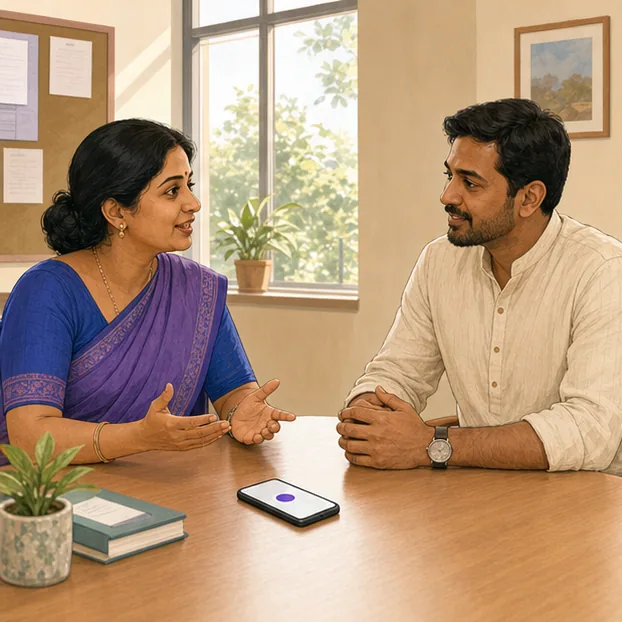
Parent-teacher meeting
A parent is speaking
Illustrated scenario · the product does not infer speaker identity in this example
Aira is taking notes
Live draft · nothing shared
From speech to clear intent
English transcript from Hindi speech
Haan, but maths… uh, we are, you know, worried
The parents are worried about maths and asked how to practise at home.
Meeting note
Student note · Class 6-BMaths practice and weekly progress updates were agreed for the next four weeks.
Speak Hindi, Tamil, Bengali, Telugu, Odia or English — Aira detects the language, shows you what it heard, and replies in the same language.
“Uh, can you, like, tell me how many students absent today?” becomes “How many students are absent today?” — fillers removed, meaning untouched.
Start from any page in the app: record a parent-teacher meeting or an admissions call (with consent) and get structured notes — summary, decisions, action items and follow-up dates — linked to the student or lead.
Audio is transcribed and discarded — only the reviewed transcript and notes are kept. Personal details are scrubbed before any text reaches an AI model.
Included with the Aira AI suite on your plan — no separate app, no extra subscription. Voice features activate when the school's voice provider is configured. Aira proposes — a person confirms.
Why Vidyapeeth360?
Admissions, classrooms, finance, transport and families depend on the same records — but fragmented tools make staff copy context between them. Vidyapeeth360 keeps the record, rule, owner and evidence connected, while authorised people stay in control.
Three school hand-offs, one operating context
Choose a real workflow to see where disconnected tools lose context.
Explore the hand-off
No automated decisions are implied. Material actions remain permission-scoped and human-confirmed.
Connected hand-off
The broken hand-off
Re-keying an admitted learner across teams creates avoidable gaps between the original enquiry, the student profile and the setup that follows.
Student 042
Synthetic record
Academic placement
Class context saved
Bring one real school hand-off to the demo.
We will map its records, rules, owners and exceptions. Product-tour access follows the reviewed demo request.
What you can verify
Evidence is more useful than a feature claim. These are the records, controls and delivery boundaries your team can examine in the product and written proposal.
Classes, sections, academic years, students, guardians and staff form the records used by the workflows your school authorises.
When admissions staff confirm conversion, the admitted lead stays linked to the new student profile used for class allocation and fee setup.
Aira can answer from permission-checked school data and propose supported next actions; authorised people confirm material changes.
A teacher reaches only the class-sections they actually teach, resolved from the timetable and their teaching assignments. Each school's data stays its own, money steps need a second approver, and every change leaves audit evidence.
Group & Chain adds member-school views and cross-campus controls where it is included in the plan and legal-entity model.
Migration coverage, providers, training, support and early-access native mobile availability are confirmed before go-live.
Plan availability, provider dependencies, migration responsibilities and rollout scope are confirmed in your written proposal.
Three straight answers to the questions schools ask us before moving.
Evidence before status
Create collection orders in the school's connected Razorpay or Cashfree account and mark an invoice paid only after verified provider evidence.
Final bank credit, timing and deductions remain provider or bank evidence for the school to reconcile.
Review fee collectionA term before a decision
Ninety days is a whole term. Collect real fees, publish real results — then decide. No card.
Public fixed billing and the reviewed per-student proposal model are shown separately.
Review plan termsReview before commit
For student CSV/XLSX migration, the copilot suggests a column map and your team validates every row in a dry run before committing the import.
The current committed path imports student records with quiet-mode controls and rollback.
See how migration worksSchool Mobile App
Parents check attendance, fees and results; teachers mark attendance and homework — in the early-access apps for families and school teams.
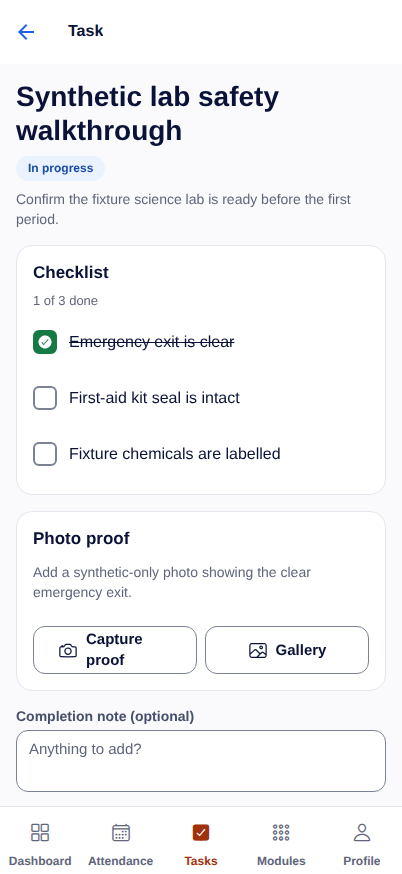
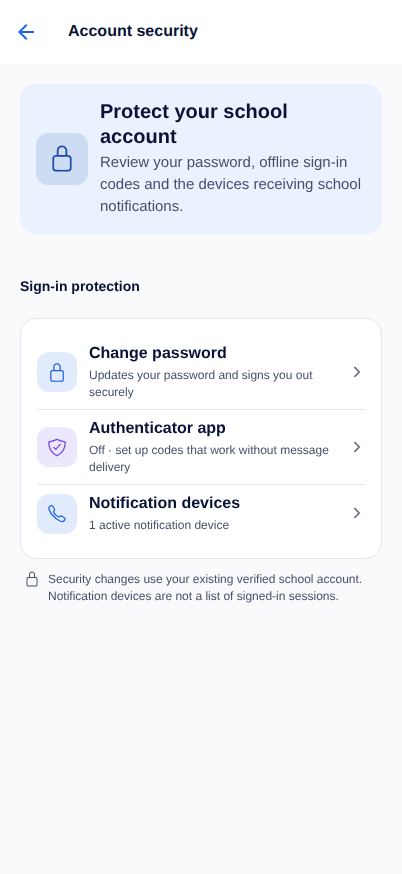
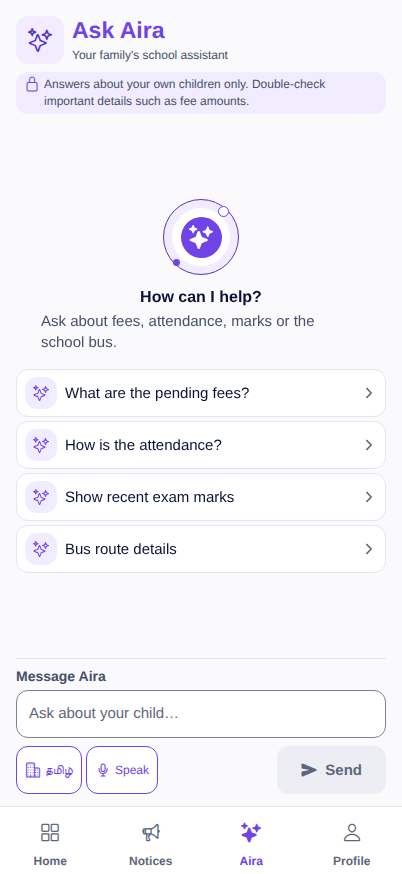
First-party mobile captures synthetic sample data
One connected mobile layer
Aira answers a family’s routine questions in one place. Support staff record on-site work with photo proof against the task it belongs to, and every person can see and manage their own account security from the app.
Availability
Native apps are in controlled early access. Public store availability follows school review and staged rollout.
Clear answers to the questions school leaders ask about scope, rollout, payments, data, privacy and AI.
Your school has an exception?
Bring one real workflow. We will review its people, permissions, providers and approval gates with you.
Evaluation FAQ
15 answers
Vidyapeeth360 is built first for Indian K–12 schools — preschool to Class 12, with class-and-section workflows throughout. Colleges, coaching centres and training institutes should talk to the team so we can map programme, batch and semester needs against the current product before you choose a plan.
There is a 90-day full-term trial, and it needs no card. The pricing page shows the plan prices and the full feature comparison; capabilities still rolling out are listed separately, and your agreement confirms the billing model that applies to your school.
See plans and full pricingChoose the plan that fits the workflows you need now. Your plan decides which optional modules are on, and capabilities still rolling out can be switched on for your school once they're available.
Use the Migration Copilot to upload a student CSV/XLSX, correct the suggested column map, validate every row and preview the batch before commit. The current Copilot commit path imports student records; staff, fee-demand and accounting imports are not implied by this workflow. Imported records stay under onboarding quiet-mode controls while the school verifies them.
Each school's records are kept separate by the database itself, not just by app settings, and the product includes consent, purpose, retention, access-control and audit workflows designed to support a school's DPDP programme. Those controls do not constitute legal certification or guarantee compliance by themselves; each school remains responsible for configuration, notices, lawful use, vendors and operating practice.
Yes. A school can connect its own Razorpay or Cashfree collection account and issue an invoice-bound, no-login Pay Now link. The invoice is updated only after confirmed provider evidence, not when a checkout window closes. Vidyapeeth360 does not pool or route school fee funds; the actual settlement account, timing, deductions and final bank credit remain provider/bank evidence that the school must reconcile.
Configured channels can include WhatsApp, SMS and voice. Delivery depends on the school's provider credentials, approved templates, consent and applicable DLT or Meta rules; each attempted send is recorded with the status returned by the provider.
Aira can answer from school records the person asking is already allowed to see, explain how a number was calculated, draft announcements and prepare actions for a person to confirm. For parents, Aira answers only about their own children. Model-written text can be wrong, and privacy safeguards are configured controls rather than a universal guarantee, so verify material answers and review each enabled AI channel before use.
Native mobile apps for parents, students and staff are in early access ahead of store release. The current builds cover selected attendance, fees, homework, results, messages and notification workflows; the responsive web portals remain available in a phone browser.
The product includes in-app help and a searchable Help Center. Support channels, response targets, onboarding responsibilities, migration coverage and the expected go-live timeline are confirmed for each school in its selected plan or proposal.
See support channels and escalationData access and exit are documented. Use supported exports while your access is active, and request access or erasure through the documented process. Retention, legal holds, backups and deletion timing follow the applicable agreement and India's phased DPDP framework — and a trial never becomes a paid subscription on its own.
The school stays in control of its records. Vidyapeeth360 processes them to run the service under your agreement, keeps each school's rows isolated through database-enforced controls, and provides supported export plus documented access and erasure processes.
There is no single fixed timeline. Setup is self-serve: register, pick your School Code, import a student CSV/XLSX through the Migration Copilot's review-before-commit workflow, and verify records in quiet mode before go-live. Migration coverage, training, support and the expected go-live date are confirmed for each school in its plan or proposal.
Vidyapeeth360 is an online product and needs an internet connection; there is no offline-first mode that keeps working without one. Records stay on the server, so nothing entered earlier is lost while you are disconnected — work resumes when the connection returns, and the mobile apps sync when connected rather than storing an offline copy.
Compute, database, storage and backup locations are documented for the school's deployment and reviewed before go-live. Ask for the deployment review during evaluation — hosting details are confirmed there, not inferred from this website.
Create your school's workspace yourself — pick your School Code, then invite your staff and set up admissions, fees, attendance and communication. Vidyapeeth360 reviews new school registrations on working days before your workspace opens.
Set up in minutes
Self-serve — no sales call required
Free trial included
No credit card needed to start
Bring everyone on board
Invite staff, parents & students anytime