Skip to content
All modules AcademicsOptional Aira or AI assistance

Result Publishing software for Indian schools

Board-configured report cards

Feature identity

Result Publishing

An illustration, not a screenshot. The interactive example below shows what this capability actually does.

Example view

Result Publishing in a school workflow

Board-configured report cards

Academics
First-party product evidenceSynthetic demo fixture · no customer data

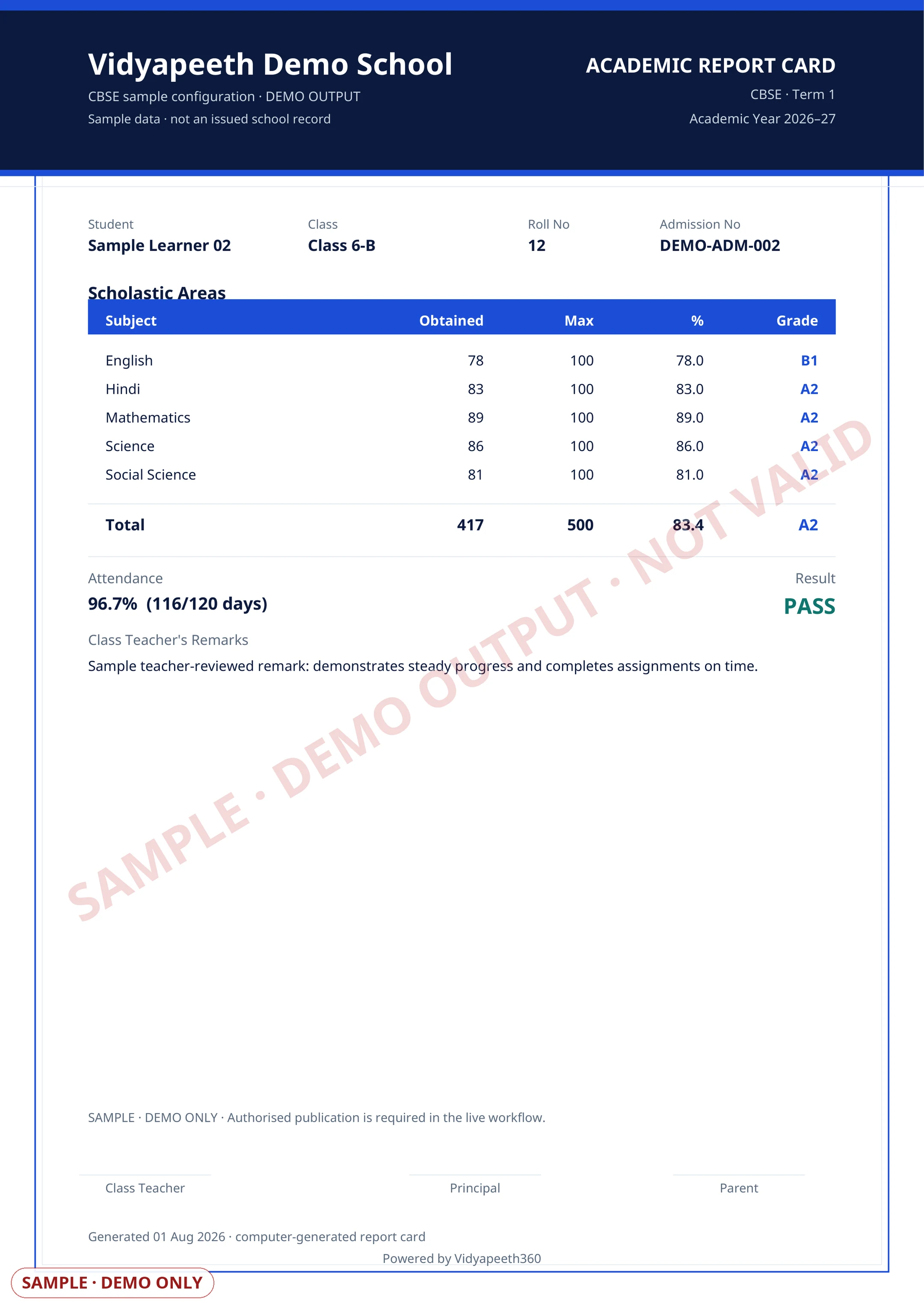
Standard report card output. Rendered by the shipped report-card PDF renderer from a deterministic fictional learner fixture.

Read the accessible sample fields
Published result previewPreview · Review · Issue
Illustrative school document

Vidyapeeth Demo School

Published result preview

Sample
Learner
Sample learner
Class
Class · Section
Reporting period
Selected term
Learning recordEvidenceReview
Each card is frozen at issue — template, brand palette and scale snapshotted so re-downloads stay byte-identicalSchool recordAuthorised review
Attendance % and NEP HPC co-scholastic grades fold into every card automaticallySchool recordAuthorised review
Draft board-appropriate class-teacher remarks with AI, translated into any of 11 languagesSchool recordAuthorised review
AttendanceSchool-recorded attendance evidence
Co-scholasticTeacher-reviewed school record
Grading legendSchool-configured bands and pass rules
Publication note

Board configuration and publication state remain visible

Value not shownIllustrative printable layout
First-party product evidence · deterministic synthetic fixture · no customer data · visibly marked SAMPLE or DEMOExample labels and outcomes come from this capability's reviewed catalogue record.

Product scope

What it does

One click turns entered marks into branded, board-aware report-card PDFs — grading bands, pass marks and NEP HPC domains come from the school's board configuration, never hard-coded. The no-code Report Card Studio lets the school redesign layout, signatories and grading scales itself.

The school problem

School teams need a dependable way to handle Result Publishing: Board-configured report cards. The required records, assigned roles and review boundary must remain explicit.

Day-to-day work

How your school uses it day to day

Board-configured report cards.

  1. Each card is frozen at issue — template, brand palette and scale snapshotted so re-downloads stay byte-identical
  2. Attendance % and NEP HPC co-scholastic grades fold into every card automatically
  3. Draft board-appropriate class-teacher remarks with AI, translated into any of 11 languages
  4. Batch-render a whole class's PDFs into one zip with a signed, expiring download link

Operational result

What your school gets

Issued board-aware report cards whose grading, template, attendance and signatory context remain reproducible on re-download.

Access and ownership

Who typically uses it

  • Exam coordinator
  • Class teacher
  • Academic coordinator
  • Principal
  • Student
  • Parent or guardian

What each person can actually see depends on the role you give them and which classes or records you assign.

Availability and setup

What to confirm before rollout

Academics catalogue capability

  • Completed marks, board configuration and an approved report-card template
  • Confirm plan scope, role permissions, data dependencies and any provider or migration prerequisites during the demo and proposal.

Flagship workflow deep dive

Exam Governance, CCE & Approval-Ready Report Cards

From marks entry to publication — without spreadsheet drift.

Configure terms, papers, board scales and report-card rules from the school's academic setup. Teachers enter scoped marks, moderators review exceptions, and authorised staff generate and publish report cards through distinct controlled stages.

Interactive operating model

The result-control rail

Move through the evidence behind a card; the visual stops at every point where academic authority is required.

Illustrative workflow · no customer data

Stage 1 of 5

Configure

The school resolves its board scale, term, papers, assessment types and report-card design.

Control point

Board configuration is authoritative; AI does not create the grading policy.

Evidence retained

Resolved scale, paper settings, signatories and template version.

Core workflows and features

The operational work behind the promise

  1. Board-resolved gradingUse the configured CBSE, ICSE, state or IB scale type, grade bands and pass marks instead of page-specific hard-coding.
  2. CCE assessment contextClassify supported assessments as formative, summative, project, oral or practical and review their configured roll-up.
  3. Paper and datesheet setupCreate term papers by class, section and subject with maximum marks, pass marks and clash-aware dates.
  4. Teacher-scoped marks entryLimit a teacher to authorised class-section-subject assignments, clamp marks to the paper maximum and preserve absence as its own state.
  5. Completion and statisticsReview entered, absent, passed, failed and aggregate paper statistics before the result deadline.
  6. Different-person moderationRoute submitted marks through the implemented second-examiner path where the school uses moderation.
  7. Publish locks and reopeningLock marks when results publish and use the authorised reopening path for a correction instead of silently editing issued work.
  8. Report Card StudioConfigure supported layout, signatories, grading scales and holistic domains without changing the result source.
  9. Readiness previewRun supported readiness checks before generating a class batch so incomplete records remain visible.
  10. Controlled card lifecycleGenerate, review, withhold, release and deliver report-card artifacts through their authorised states.
  11. Frozen issue contextRetain the issued template snapshot and version so later design changes do not rewrite an earlier card.
  12. Supported exportsUse the implemented CBSE OASIS, ICSE or state-oriented output where available, and batch cards into an expiring ZIP link.

Aira for analysis and remarks

Let AI draft the words — not the marks or the decision.

Aira can explain aggregate exam patterns and prepare a board-aware class-teacher remark from permitted marks, attendance and configured academic context. The returned text remains an editable draft.

  • Explain supported class-level exam aggregates without receiving student names for the aggregate-analysis request.
  • Draft a class-teacher remark only when the permitted report-card evidence contains marks.
  • Suggest strengths and focus areas for a teacher to verify against the source record.
  • Optionally translate a reviewed remark when the configured provider, language and your plan support it.
  • Prepare a sanitized report-card design suggestion without altering marks or publication state.

Human boundary

Aira does not assign or change marks, determine pass or fail, approve moderation, sign a card, publish results or release a withheld card. Teachers and authorised examination staff own every saved remark and publication decision.

Key daily uses

What the school team does here

  1. Configure a term and publish a clash-checked examination plan.
  2. Track missing or invalid marks before the entry deadline.
  3. Moderate submitted marks through a different authorised reviewer.
  4. Preview a class's report-card readiness and resolve incomplete records.
  5. Generate, approve, withhold or release report-card artifacts.

Used by

  • Subject teacher
  • Class teacher
  • Examination controller
  • Academic coordinator
  • Moderator
  • Principal
  • Parent or student after publication

Actual access follows the school's plan, role permissions and record scope.

Measurable operating indicators

Metrics to track — not guaranteed ROI

Establish a baseline before rollout, agree the reporting period, then compare the school's own source evidence.

Marks completion

Entered or explicitly absent cells ÷ expected mark cells

Makes missing entry work visible before publication rather than hiding it in a class average.

Report-card readiness

Complete, partial and missing student records before generation

Shows which records need review before a batch is generated.

Publication control

Pending moderation, withheld cards, reopened papers and correction events

Tracks governed exceptions without treating publication speed as the only quality measure.

Prerequisites and availability

Confirm the operating context before rollout.

Academic catalogue capability · board configuration required · optional Aira on plans that include it

  • Configure the school board, academic year, grading scale, classes, sections, subjects and teaching assignments.
  • Create the term and papers, then complete the permitted marks and moderation workflow before publication.
  • Board export availability depends on the selected board and the supported output for that workflow.
  • Aira remarks need the Aira AI assistant included on your plan, available credits and a teacher review before save or publication.

Connected operating context

Available workflows

These are the documented neighbouring capabilities that school teams may review with this module. A related page does not imply that every hand-off is automatic or enabled in every plan.

Explore all modules

Buyer questions

Frequently asked questions

The questions school owners ask before they subscribe: what it does, who can see it, and what to set up first.

Can marks change after results are published?

Not silently. Published marks lock, and the sanctioned exception is the re-evaluation workflow: a family requests a re-check of one paper, an authorised re-marker revises that single mark, and the result re-derives with the trail preserved.

Do report cards follow our board's grading?

Grading is configuration, not code. Bands, pass marks and the marks-versus-grades scale come from your board configuration, so a percentage-only state-board card and a grade-point card both render from the same engine.

Can we hold back one student's report card?

Yes. Publishing is term-level, and an authorised person can additionally withhold an individual card with a recorded reason; the family's portal does not show it until it is explicitly released.

Does Result Publishing work on its own?

Digital Gradebook, Exam Reports, Report Card AI, Export PDF are the documented neighbouring capabilities. They help a school evaluate the surrounding hand-offs, but a related page does not mean every integration is automatic or included in every plan.

What should our school prepare before enabling Result Publishing?

Completed marks, board configuration and an approved report-card template. Confirm plan scope, role permissions, data dependencies and any provider or migration prerequisites during the demo and proposal.

Is AI used in Result Publishing?

Optional Aira or AI assistance. Aira supports only the reviewed actions listed on this page, and authorised people remain responsible for confirming material actions.

How do we confirm the plan and implementation scope?

Plan inclusion and rollout scope depend on the live plan matrix, readiness state and your school's written proposal. The demo team will confirm the applicable boundary before rollout.

See it in your school context

Run result publishing the connected way.

See how this workflow fits your school's current records, roles, plan and rollout requirements.